FREE shipping-No minimum!
Special OfferFree gift with any $50 Dunder Mifflin purchase![ Collapse Deal ]
Series Finale Special! Your choice of FREE gift with any $50 Dunder Mifflin purchase.
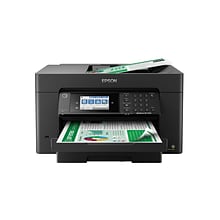
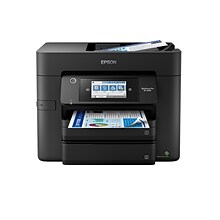
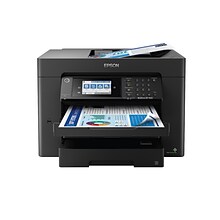
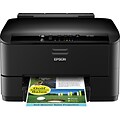
EPSON® WorkForce® Pro WP4020 Inkjet Printer

EPSON® WorkForce® Pro WP4020 Inkjet Printer

Item # 901-WP4020   Model # C11CB30201
• Print Technology: Inkjet  • Maximum Mono Print Speed (ppm): 16  • Maximum Print Resolution: 4800 x 1200 dpi  
78% of respondents would recommend this
$99.99
Each
Was:   $149.99
You Save: $50.00
$99.99 after $50 Instant Savings. Offer good through 6/28/13. While quantities last.
This Item qualifies for FREE Shipping*
Your delivery dates will be verified at checkout
Go
Enter Zip CodeParcel
Engineered for professional-quality color documents and productivity with a 50% lower printing cost than color laser printers*

Ethernet and Wi-Fi® World's fastest automatic 2-sided printer—ideal for busy workgroups** EPSON® Connect feature provides instant wireless printing from popular mobile devices*** MicroPiezo® inkjet technology produces smudge-, fade- and water-resistant documents Prints up to 16ppm (black) and 11ppm (color) with up to 4,800x1,200dpi resolution; printing up to 8-1/2x14" 250-sheet input tray, plus 80-sheet multipurpose tray for envelopes, labels and specialty media 20,000-page monthly duty cycle ENERGY STAR® qualified Hi-speed USB 2.0 interface (cable sold separately) 10/100 Base-T Ethernet and wireless (802.11 b/g/n) networking Got a question? Give us a call and we'll help! Call 1-800-789-1331.

*Compared with best-selling color laser all-in-ones priced at $499 or less, as of December 2010. Calculation based on continuous printing with highest-capacity cartridges. Actual savings will vary based on print task and use conditions.
**Fastest in its class; printing black text in default, 2-sided mode, in accordance with ISO/IEC 24734. Compared to inkjet all-in-ones priced at $499 or less, as of January 2011, based on manufacturers' rated ISO speeds or independent testing.
***See Epson.com/connect regarding compatible devices and apps.
General Information
Manufacturer Part Number :
C11CB30201
Manufacturer :
Epson Corporation
Manufacturer Website Address :
www.epson.com
Dimensions :
18-1/10" x 25-2/3 x 15-1/10"
Product Line :
Epson WorkForce
Technical Information
Print Color :
Color
Print Technology :
Inkjet
Maximum Mono Print Speed (ppm) :
16
Maximum Color Print Speed (ppm) :
12
Maximum Print Resolution :
4800 x 1200 dpi
Duplex Printing :
Automatic
Number of Input Trays Install :
1
Copy/Scan :
No
Interfaces/Ports
Interfaces/Ports :
1 x USB1 x Ethernet1 x Wi-Fi
Network & Communication
Network :
Ethernet
Wired :
Yes
Wireless :
Yes
Ethernet :
Yes
Controls/Indicators
Display :
No Display
Media Types & Handling
Media Type :
Bond Paper
Media Size :
A5Letter4" x 6"B5
Media Handling :
1 x Input Tray 250 Sheet1 x Multipurpose Tray 80 Sheet
Fonts & Emulation
Language Emulation :
Epson ESC/P-R
Power Description
Input Voltage :
110V AC
Physical Characteristics
Height :
15-1/10"
Width :
18-1/10"
Depth :
25-2/3"
Compatability
Compatibility :
PCMac
System Requirements :
Windows 7, Windows Vista, Windows XP, Mac OS X 10.4.11, 10.5.x, 10.6.x
Miscellaneous
Certifications & Standards :
Energy Star, Safety Standards: Safety standards UL60950, CSA C22.2 No. 60950, EMI FCC Part 15 subpart B class B, CAN / CSA–CEI / IEC CISPR 22 class B, Telecom Regulations: FCC Part 68 (U.S.A.), IC/CS03 (Canada)
Brand :
Epson
Country of Origin :
IDN
Warranty
Standard Warranty :
1 Year Limited
Weight
Weight :
1.00 lbs. per Each

REVIEW SNAPSHOT®

by PowerReviews
EPSON� WorkForce� Pro WP4020 Inkjet Printer
 
3.9

(based on 75 reviews)

78%

of respondents would recommend this to a friend.

Pros

  • Easy to use (16)
  • Fast print time (15)
  • Easy to set up (13)
  • Low ink consumption (10)
  • Reliable (9)

Cons

  • Large footprint (7)

Best Uses

  • Black & white documents (11)
  • Graphics & charts (9)
  • Professional documents (6)
  • Photos (5)
    • Reviewer Profile:
    • Frequent user (10), Heavy duty user (7)
    • Primary use:
    • Business (10), Personal (10)

Reviewed by 75 customers

Sort by

Displaying reviews 1-10

Back to top

Previous | Next »

 
4.0

Epson-some good-some not so much

By Seniorellie

from Honesdale, PA

Comments about EPSON� WorkForce� Pro WP4020 Inkjet Printer:

Good value for the money. Double sided printing was a plus for me. Unit is rather large for home use. Would look better in an offfice. Was easy to set up. Very noisy. Takes a long time to power down. Printed page looks really good.

 
5.0

Pro 4020 is great!

By tommy g

from Dallas

Comments about EPSON� WorkForce� Pro WP4020 Inkjet Printer:

This printer has it all. EZ setup, networked, and brilliant sharp color. Did I say color? Yep, sharp, brilliant color. Never go back to a laser again.

 
4.0

like this printer

By Joey Boy

from The Villages , FL

Comments about EPSON� WorkForce� Pro WP4020 Inkjet Printer:

We had a little trouble setting it up for wireless with our Mac...Just finished, had to call in the pro from down the street...all-in-all it's looking good...

 
4.0

My favorite printer so far

By sdollar

from Scottsdale, Arizona

About Me Heavy Duty User

Pros

  • Easy To Set Up
  • Easy To Use
  • Fast Print Time
  • Low Ink Consumption
  • Reliable

Cons

  • Flimsy Construction
  • Large Footprint

Best Uses

  • Black & white Documents
  • Graphics & Charts
  • Photos
  • Professional Documents

Comments about EPSON� WorkForce� Pro WP4020 Inkjet Printer:

This printer and I have a love-hate relationship. As a writer who has to print book manuscripts, I really appreciate this printer's larger paper capacity and speed. It's very fast, the print quality is excellent, and the double-sided printing is definitely a paper saver when printing manuscript drafts. Color printing is also excellent quality. Setup was very easy, but you must go online and download and install any available driver updates before you start. The instructions tell you to do it. DO IT. The control panel makes sense. Ink usage seems to be, so far, very reasonable, but time will tell.

I didn't rate this at 5 stars because of 3 negative things: 1) This is my first venture into wireless-ness, and, stupid though I know it may sound, I didn't realize I needed to have a router. Nowhere on the packaging or in the very brief instructions does it mention that. While setting up for wireless seems otherwise very straightforward, I won't know for sure until I get a router. 2) Large footprint. I measured the printer in the store to see if I could place it in my small home office, but the real pigginess of it didn't hit me until I got it unpacked and put it in place. The dimensions given online are accurate, but I suggest adding a couple of extra inches to your calculations, in each direction, to give it some "elbow room". The envelope feeder needs room to stick up above the top of the printer. The paper catcher needs several inches to extend out in front of the printer. 3) The paper catcher is very constructed in a cheap, flimsy way. Since this seems to be a failing of most lower-end printers, I wasn't surprised, but Epson makes much about the WorkForce Pro printers being muscle printers, so they should step up and add a decent paper catcher. The existing catcher telescopes out in 3 succesively smaller pieces, then you must flip up a smaller piece that keeps the sheets from zooming off of the end of the catcher. While the catcher is extended, it is very vulnerable to breakage - an accidental hard bump of an elbow would do it - so the natural thing is to push it back in ASAP to keep it safe. Unfortunately, the pieces don't slide home very efficiently. It always takes a lot of fiddling to get them nested correctly so the unit will slide back flush with the side of the printer.

Another reviewer complained that this is not an all-in-one or 3-in-one printer. I knew that going in and but I chose the larger paper and ink capacity and double-sideed printing over multi-function. Except for the 3 negatives I've mentioned above, since I have a good scanner (also an Epson) and can use it for document copying, and don't want a fax machine, this printer is perfect for me.

  • Primary use:
  • Personal
 
4.0

1st Epson Printer

By wad7my

from New Orleans, LA

Comments about EPSON� WorkForce� Pro WP4020 Inkjet Printer:

Got our 1st Epson printer in Feb 2013. It worked quite well until Mar 25, 2013, then there was something wrong with the papertray & it stopped printing. I did all the troubleshooting & then called Epson in Calif. Ken went through all the trouble shooting again & the decision was made to replace the unit. I really like this printer. I need to be able to print out regulatory document originals with color headers & revisions hi-lighted, so this makes my job much easier. I would recommend this product. I think the 1st was just a fluke & not representative of their products. Epson was quick to rectify the problem.

(1 of 1 customers found this review helpful)

 
5.0

Easy to use. Fab tech support.

By Joyful

from Minneapolis MN

Comments about EPSON� WorkForce� Pro WP4020 Inkjet Printer:

It was super easy to set up this printer. Good quality prints in color and BW. Speedy. Today I changed wireless providers and needed to change the wifi settings on the printer. I called tech support and received EXCELLENT service. I am very pleased with the product and the customer service.

 
4.0

I like this Printer!!!

By bobbyguitars

from Detroit

About Me Heavy Duty User

Verified Buyer

Pros

  • Easy To Use
  • Quality Prints

Cons

  • Large Footprint
  • Too much ink used

Best Uses

  • Black & white Documents
  • Graphics & Charts
  • Photos
  • Professional Documents

Comments about EPSON� WorkForce� Pro WP4020 Inkjet Printer:

Produces Excellent color graphics and photos BUT you must use the best possible print quality option or results are mediocre.

Printer uses alot of ink when printing at such high quality resolutions and it takes longer to print a page. But the results are worth the extra wait.

Unfortunately Epson ink is never on sale.

Instead..... find and purchase refillable ink carts (with a re-setable chip) and never worry about that high ink expense again!

  • Primary use:
  • Business
 
4.0

Great print quality

By Fijilini

from Anaheim, CA

Comments about EPSON� WorkForce� Pro WP4020 Inkjet Printer:

I have been researching/looking for a wireless color printer and decided on the Epson WP 4020. The wireless set-up was not as easy as other brands, but after calling Epson online tech support, I was directed to a video (http://www.epson.com/cgi-bin/Store/support/supAdvice.jsp?BV_UseBVCookie=yes&noteoid=202085&type=highlights) which was a great help. Though the online support tech was very abrasive, but in the end, the results were satisfactory. After a few hours, the printer was up and running well; even the wireless connection was seamless. The only negative about this unit is its large size - very bulky/takes up a lot of space. On the other hand, great prints, cheap ink refills and the printer itself was only $99 + tax with free shipping more than made up for minor issues. So far so good.....

 
1.0

A WASTE OF TIME

By Frustrated in

from Strawberry, CA

About Me Frequent User

Pros

  • Low Ink Consumption

Cons

  • Hard Setup
  • Hard To Use

Best Uses

  • Black & white Documents

Comments about EPSON� WorkForce� Pro WP4020 Inkjet Printer:

I could not get printer to print a full page document on more that 1/2 page landscape. Checked all the settings, went online for help with no luck. I spent over 10 hours trying to get it to print. Returned to Staples today and purchased a Brother printer.

  • Primary use:
  • Personal

(1 of 1 customers found this review helpful)

 
5.0

WP-4020 Works Great - Great Customer Service.

By jimmy

from Nevada

Comments about EPSON� WorkForce� Pro WP4020 Inkjet Printer:

I've used this printer for about 1 week now with no problems. Works great. Had a question about the ink levels that came with the printer but Customer Service took care of that by sending me new ink cartridges (overnight shipping) Great customer service, Thank You.

Displaying reviews 1-10

Back to top

Previous | Next »

Box Contents
The following items will be included with your purchase:
EPSON® WorkForce® Pro WP4020 inkjet printer
DURABrite® Ultra starter black ink cartridge
DURABrite® Ultra starter cyan ink cartridge
DURABrite® Ultra starter magenta ink cartridge
DURABrite® Ultra starter yellow ink cartridge
Instruction booklets
CD-ROM containing drivers
Power cord
Free sample paper pack
Warranty information

Product Upgrade

Accessories

Warranties & Services

Add extra security with our extended warranty—the easy, inexpensive way to protect your investment!
Manufacturer's Warranty
Standard Warranty : 1 Year Limited
Extended Warranty Price Unit Take Action
1-Year One-Time Replacement Product Protection Plan
1-Year One-Time Replacement Product Protection   Plan

901-Q149

$19.99 Each Buy
Online Peripheral Install & Setup

901-9003PSU

$59.99 Each Buy
Extended Warranty Price Unit Take Action

Upgrade your printer!

EPSON® B310N Color Inkjet Printer

$399.99
Each

Frequently Bought Together

EPSON® Pro WP4020 Inkjet Printer $99.99 Quick Info
EPSON® 676 XL Pro Hi-Cap. Black Ink Ctdg. $38.49 Quick Info
EPSON 676 XL Pro Hi-Cap Yellow Ink Ctdg $24.49 Quick Info

Customers who bought this item also bought

ink & toner recycling program

Customers also viewed

Close Message Expect the unexpected!

Can't find what you need? Contact Us

©Quill Lincolnshire, Inc. 2013 , All Rights Reserved.

This Web site is intended only for use by U.S. residents.

loading Loading...