
Free with your Quill account
Easily control company purchases with Purchasing Manager
Set purchasing rules, simplify approvals, and see how your organization is spending. Purchasing Manager helps you control costs, improve compliance, and save time with customized workflows built into your Quill account.

How it works
More control, built around your business
Give the right people the right level of purchasing access while keeping company guidelines and approvals in place.
Purchasing rules
Set purchasing limits and guidelines by employee, product category or location.
Purchasing roles
Assign the right permissions and responsibilities to each person on your team.
Approval groups
Automatically send purchase requests to the right people for faster approval.
Purchasing rules
Set the rules for every purchase
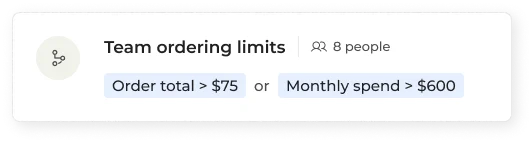
Create purchasing rules based on employee, product category, or location. Your team can shop for what they need while Purchasing Manager helps keep every order within your company guidelines.
- Order minimums and maximums per person or location
- Company lists to steer everyone to approved items
- Approval groups with multiple tiers for bigger purchases
Visibility
See every order, past and present
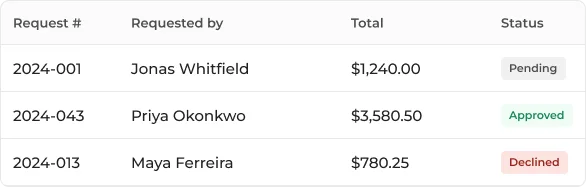
Keep sight of purchasing activity across your organization in one place. Review order details and approval history whenever you need them, without chasing down emails or spreadsheets.
- Track purchasing activity across your organization
- Review approval status and history
- See company purchases together in one place
Speed
Speed up approvals
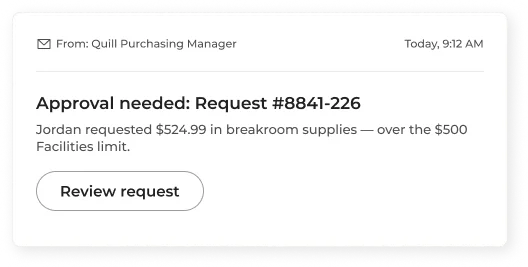
Purchasing Manager automatically routes requests to the right approvers and lets them take action directly from email, helping your team get what it needs faster.
- Automatically route requests to the right approvers
- Direct-from-email approval requests
- Adjust quantities and payment details before approving
- Requestors updated throughout the process
Free with your Quill account
Adding 10+ team members?
Save yourself the headache and leave the setup to our well-trained Sales Team. Simply download the excel spreadsheet below, add your team, and we'll take care of the rest.
Download excel templateWant to chat first?
Talk to a Quill expert for all your questions (a real person, not a robot!). Call us at 1-877-413-0011
Get help in 3 steps
-
Download the template
Complete the template with your organization's information.
-
Add your people & rules
We'll help you set up each person on your team with the right permissions.
-
Send it back. We'll build it.
Email the completed template to our team. We'll configure everything and let you know when it's ready.
Send email to: brenda.young@quill.com
Frequently asked questions
Your Purchasing Manager questions, answered
Find quick answers below or visit our Help Center for step-by-step guides, videos and more Purchasing Manager resources.
Visit help centerJust a few basics:
- Your name, email and phone number
- Your company details
- Your billing and shipping addresses
Have those handy and you can start right away.
No. Purchasing Manager is free with your Quill account — no subscription and no setup fee.
Yes. Team members with an existing online Quill account can be added to Purchasing Manager right away, and anyone new will be invited to create their own login under your company account. Either way, as an admin you control what each person can buy and can track their orders. Billing stays together on your company account.
Most admins are up and running in a few minutes. Adding people and approval is now quicker with reusable rule setup and guided setup — and you can do it in stages and come back at any time.
Yes, any time. As an admin you can add or remove people, update spending limits and approval rules, and change settings as your team or your process changes.
No — you decide what needs a second look. Orders that meet your rules go straight through, exactly as they do today. Only orders that fall outside your limits are sent for approval, and those go directly to the right approval group, who can approve them in a couple of clicks.
Yes. When a purchase needs more than one review, you can set up approval groups that pass a request along in sequence — for example, once the first approval group approves a request, it can automatically move to the second approval group for the next review and so on till the final approval.
Admins only. Whoever sets up Purchasing Manager starts as an admin and can give admin access to others. Admins set spending limits, build approval groups, and decide who can buy what.


