
Please choose at least 2 items to compare
Page 9 of Printer Accessories & Replacement Parts
(195 Products)
Filter by:
Printer accessories & replacement part type
Printer Ribbon (32)
Fuser Unit (20)
Maintenance Kit (20)
Paper Tray (12)
Staple Cartridge (10)
Waste Cartridge (20)
Other (12)
Photoconductor Unit (3)
Printer Transfer And Roller Kit (9)
Toner Collection Unit (5)
Transfer Belt (5)
Printer Imaging Unit (3)
Printing Assembly (1)
Developer (5)
Drum Kit (1)
Media Bin (1)
Moblie Print Accessory (1)
Photoconductor Kit (1)
Print Head (1)
Print Server (1)
Ribbon (1)
Roll Holder (1)
envelope feeder (1)
Product ratings
and up
(44)
and up
(59)
and up
(64)
Price
$0 - $10 (3)
$10 - $20 (15)
$20 - $30 (16)
$30 - $40 (17)
$40 - $50 (15)
$50 - $60 (8)
$60 - $70 (7)
$70 - $80 (10)
$80 - $90 (7)
$90 - $100 (2)
$100 - $150 (25)
$150 - $200 (12)
$200 - $300 (22)
$300 - $400 (13)
$400 - $500 (9)
$500 - $750 (10)
$750 - $1000 (1)
$1000 - $1250 (1)
$1250 - $1500 (1)
$1500 - $1750 (1)
Back
Brand
-
Printer Ribbon (32) -
Fuser Unit (20) -
Maintenance Kit (20) -
Paper Tray (12) -
Staple Cartridge (10) -
Waste Cartridge (20) -
Other (12) -
Photoconductor Unit (3) -
Printer Transfer And Roller Kit (9) -
Toner Collection Unit (5) -
Transfer Belt (5) -
Printer Imaging Unit (3) -
Printing Assembly (1) -
Developer (5) -
Drum Kit (1) -
Media Bin (1) -
Moblie Print Accessory (1) -
Photoconductor Kit (1) -
Print Head (1) -
Print Server (1) -
Ribbon (1) -
Roll Holder (1) -
envelope feeder (1)
Printer Accessories & Replacement Part Type
-
and up (44) -
and up (59) -
and up (64)
Product Ratings
-
$0 - $10 (3) -
$10 - $20 (15) -
$20 - $30 (16) -
$30 - $40 (17) -
$40 - $50 (15) -
$50 - $60 (8) -
$60 - $70 (7) -
$70 - $80 (10) -
$80 - $90 (7) -
$90 - $100 (2) -
$100 - $150 (25) -
$150 - $200 (12) -
$200 - $300 (22) -
$300 - $400 (13) -
$400 - $500 (9) -
$500 - $750 (10) -
$750 - $1000 (1) -
$1000 - $1250 (1) -
$1250 - $1500 (1) -
$1500 - $1750 (1)
Price
-
Minority Owned (4) -
Small Business (4) -
Women Owned (4)
Diversity Manufacturer
-
ID Card Printer Ribbons (5) -
ID Card Printer Kit (1) -
ID Card Printer Accessories (2)
ID Card Printer & Accessory Type
-
Original (4)
Ink or Toner Cartridge Type
-
1/Pack (4)
Ink or Toner Pack Size
-
0 (4)
Number of Color Cartridges
-
Buy more & save! (4)
More Ways to Save
-
Best Sellers (62) -
Remanufactured (35) -
Recycled (4) -
Refurbished (1)
More Ways to Shop
Top
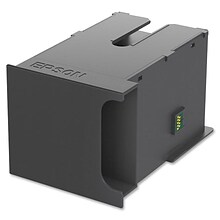
Epson Maintenance Box Print Head (C13T671000)
Item #: 901-T671000
Inkjet
Black
Stores ink flushed from system during print head cleaning.

NCR ATM SDM2 6682/6684/6688 Printer Ribbon, Black (9417-0069-EACH)
Item #: 901-24634979
Item #: 901-24634979
Compatible with NCR SDM2 endorser models.
Provides sharp, smudge-free printing for endorsements.
Durable design for extended operational life.
Lexmark Transfer Module Maintenance Kit for C792/X792 (40X7103)
Item #: 901-409789
Transfer module maintenance kit for your color laser printer
Compatible with Lexmark X792de, C792de
Offers duty cycle of 200000 pages for increased productivity
Want to know more about Page 9 of Printer Accessories & Replacement Parts
Do I need a printer maintenance kit?
Quill recommends it — printer maintenance kits help extend the life of your machine and prevent common issues. They may include replacement rollers, fusers, cleaning cloths, swabs, or lubricants. If you're seeing paper jams, print quality problems, or slow performance, a maintenance kit can often fix it without needing a full repair.
How do I know when a printer part or accessory needs to be replaced?
Watch for these signs that it’s time to replace a part or accessory:
- Faded or streaky prints
- “Low ink” or “replace toner” alerts
- Color imbalance or blank spots on the page
Printheads
- Missing lines or smudged ink
- Cleaning cycles don’t resolve the issue
- Dull or inaccurate colors
Rollers or feed mechanisms
- Frequent paper jams or misfeeds
- Skewed prints or alignment issues
- Grinding noises during use
Drum units (laser printers)
- Black marks or streaks on prints
- On-screen or software warnings
- Poor image quality despite new toner
Fusers
- Toner rubs off the page
- Uneven toner coverage
- Error messages related to heating
Most printers will alert you via screen, lights, or software when parts need attention. For more specific details, check your user manual or the printer’s maintenance settings.
Edit Delivery frequency